Once you are set up on UntilGone, gaining promotional placement on their site is straightforward.
- Go into inventory drawer or feeds and select the product(s) you want to promote. Keep in mind that the larger the discount between your organic retail price on other channels and UntilGone's cost, the higher the likelihood of prominent placement and sales volume.
- Inventory drawer option: Open the drawer for each item, then click the ellipses (three dots) to expose the modal. Under the Promotion section, input recovery (what UntilGone will pay you), start date ("now", if in stock) and end date (+1 week min). Make sure the product is set to on (yellow or green). Click save changes.
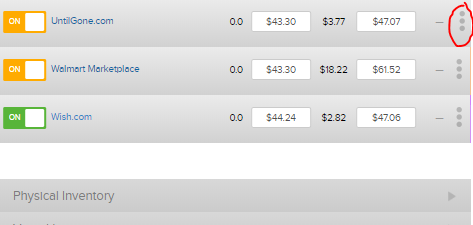
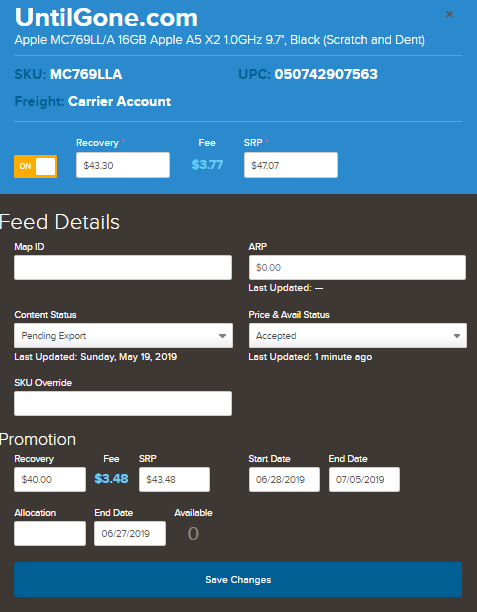
- Feeds drawer option: Open the feeds drawer for each item. Under the Promotion section, input recovery (what UntilGone will pay you), start date ("now", if in stock) and end date (+1 week min). Click save changes. Make sure the product is set to on (yellow or green).
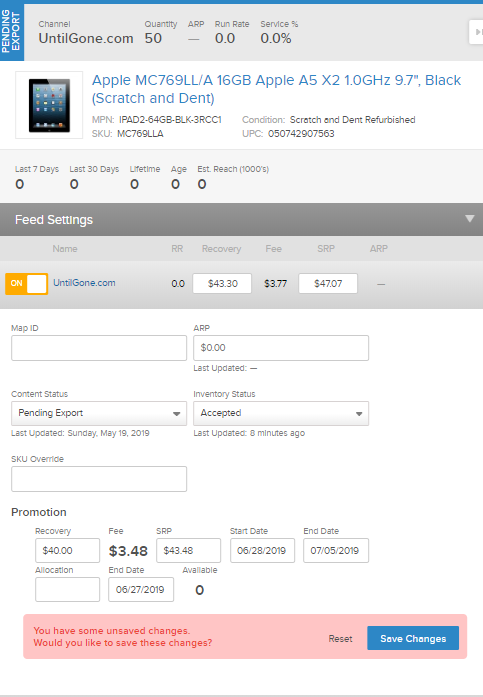
- Inventory drawer option: Open the drawer for each item, then click the ellipses (three dots) to expose the modal. Under the Promotion section, input recovery (what UntilGone will pay you), start date ("now", if in stock) and end date (+1 week min). Make sure the product is set to on (yellow or green). Click save changes.
- Step 1 will trigger a notification to UntilGone's merchandising team. You should expect to hear back within 24 hours via email. If a new cost is negotiated, promotional period is changed or they ask to allocate quantity, you can update Quipt and the data will sync within 30 minutes.
- On the start date/time specified within Quipt, your promotion will be locked in and synced with UntilGone's API. Upon end date/time, the promotion will be removed and Quipt will go back to sending your organic SRP if their feed remains on.
Comments
0 comments
Please sign in to leave a comment.