You will receive a confirmation email from Facebook if any of your products have been selected for featured placement. Use the information to administer within Quipt.
How To Set Up a Facebook Featured Deal
Step 1: Open the modal for the Facebook Marketplace feed by clicking on the icon with 3 circles.
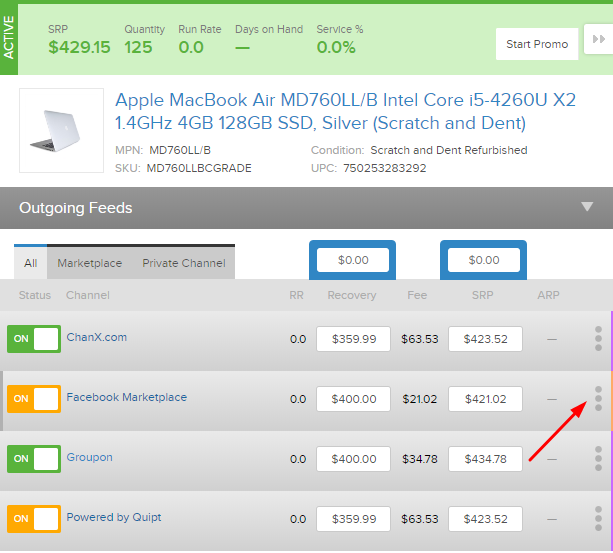
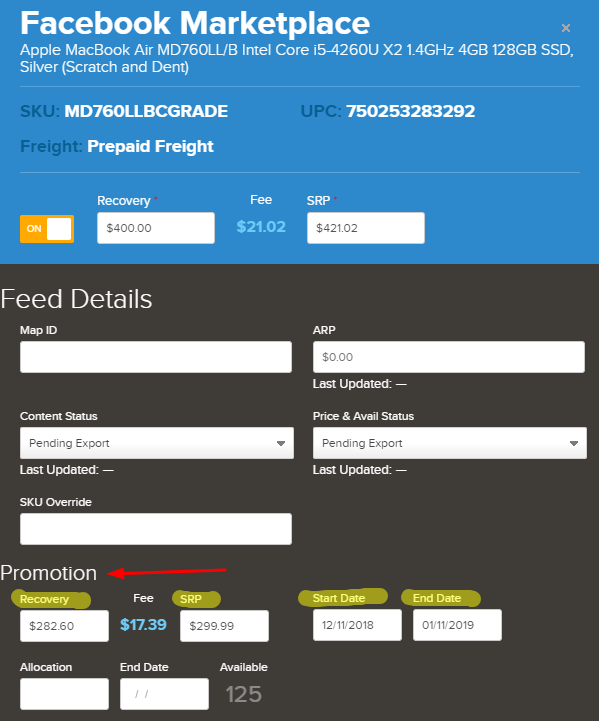
Step 2: Input the MSRP into the SRP field (inline with the On button near top of modal). Plus add the promotional price within PROMOTION SRP field. This will be the same price as you offered for featured placement unless they are subsidizing. Schedule a start and end date and hit “Save Changes”.
Optional: you can allocate quantity but this is ONLY mandatory if the deal is subsidized. For subsidized deals you should allocate UP TO the qty within the confirmation email. Exceeding may result in subsidies not being honored.
Additional notes:
-The Promotion SRP and dates should mirror what is provided by Facebook when they confirm placement.
-If Facebook subsidizes your product(s) input the fully subsidized price within Promotion SRP. This is what the consumer will pay and Facebook will pay you the subsidy times the number of units sold.
- If you are asked to change any content, you will need to administer on Facebook's portal. Quipt creates the catalog data but cannot overwrite.
For more information on the Facebook Deals program, see the following article.
Comments
0 comments
Please sign in to leave a comment.