Once you have chosen a listing to clone or a category, the ‘Offer Details’ section will automatically open up. This section is where we find the specifics of things like warranty information, MPN, UPC, condition, accessories included, and shipping details.
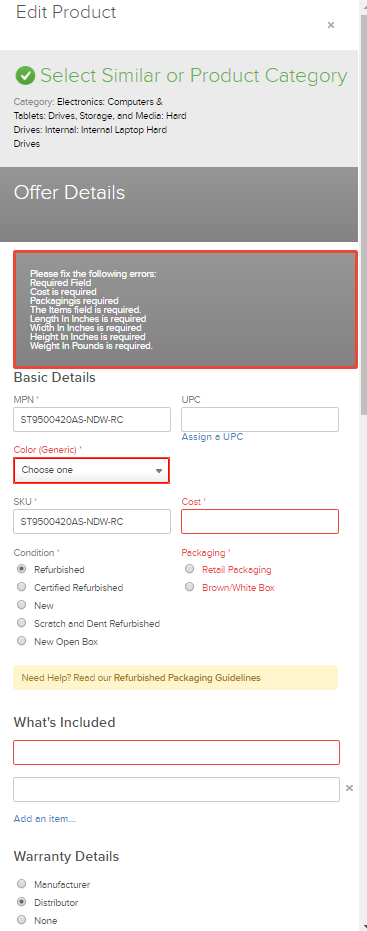
Some major areas to pay attention to while completing this section are:
1. MPN (Manufacturer Part Number):
- The MPN identifies the part as belonging to and originating from a specific manufacturer.
- The MPN is the manufacturers part number, and should not be the merchant’s internal sku number or part number, unless the sku happens to be identical to the MPN. Example of a MPN (Manufacturers Part Number): JKAA98#ABA
- This is different than thee model number, which is related to the brand of the product and is normally shorter than the part number (ex: OptiPlex 3020, HP 17-J109 Notebook PC
- Example of a Model #: 17-J109, 3020
- Do not confuse MPN with model number. Model number is typically included within the next step in the part set up process but never used for MPN.
2. UPC and Condition:
- If the item is in new condition (see Condition Guidelines for clarification) then the original UPC can and should be used.
- If the item is not in ‘NEW’ condition , we CANNOT use the original UPC; you need to ASSIGN a UPC using the ‘Assign a UPC’ button. If a UPC is already in this area, best practice is to clear it out and assign a new one.
3. SKU:
- a SKU is unique and can only exist once, not only in Quipt, but on all retailer websites. This data point is used for communicating price, availability, orders, returns, and accounting reconciliation. As this data point is tied to a specific physical asset, there should be zero deviation of the physical items sharing this SKU
- All SKUs are expected to be identical including but not limited to; Cosmetic condition, functional grade, model, specifications/configuration, color, size, shape, accessories included, warranty, packaging, etc.
Merchant Physical SKU
- a physical SKU is the 1:1 link between a physical asset and your inventory manage system. SKUs should be the consistent internal reference to maintain quantity management and should not vary between multiple channels.
- Physical SKU is DETERMINED BY MERCHANT. Applies only to merchant, not exposed to any seller or consumer, nor does it reference any specific details about the item
Quipt SKU
- Quipt's catalog data has a "Quipt SKU" attached to the catalog record.
- Quipt SKUs removes spaces, dashes, and other special characters to translate Physical SKUs into a format that is accepted by all marketplaces and outgoing channels.
- Users will either match physical SKUs to Quipt catalog SKUs or enrich with content that will be used to create listings across all connected channels
4. Cost:
- This field is used for profitability reporting. If you want to use Quipt to track profitability, then fill in this field with the amount you recovered the item for, per unit. If you do not want to use Quipt for profitability, then you can leave this field at 1 or 0.
- Note: No matter what value you enter into this field, this is for internal use only, and does not get pushed to channels. Consumers never see this information, and it does not affect the listing of items in any way.
- The next section, Product Details goes over how to fill in the more in-depth category specific attribute data
5. What's Included:
- This is the list of items that will be coming in the box when the product is shipped. For non-new listings, most sites require all original accessories necessary to use a device to be included. EG: Amazon, BackMarket, Groupon, etc.
6. Warranty Information:
- Dealer or Manufacturer?: The Manufacturer will cover the warranty when there is a manufacturer’s warranty. When Quipt is the merchant of record, then ‘Dealer’ is the warranty provider. Information provided as follows:
- Dealer -
- Phone number: 888.982.4269
- Email: support@chanx.com
- Manufacturer - This information will come from the tech support of the manufacturer directly. You need to find a good email and phone number, as this changes from manufacturer to manufacturer.
- The period is typically 90 days, but make sure to check, because occasionally on certain items, the warranty period could be a different time period, like 1 year.
7. Shipping Dimensions and Weight:
- When inputting shipping dimensions, make sure to input the actual shipping information, and not the item’s dimensions. If you can’t find shipping information, then take item dimensions and round up to accomodate for accurate shipping. These dimensions determine pricing for shipping, since the size of the box and weight of the item determine how much shipping will cost.
8. Units per carton:
- This field contains information about the maximum number of units that can be master boxed if you want to combine multiple items in a single box. If you leave this field as ‘1’, then all orders will be shipped separately by default. If you want to be able to ship multiples of an item in a single box, then you need to fill out this field.
Comments
0 comments
Please sign in to leave a comment.