Purpose:
Using Quipt's "All-On, All-Off, Toggle-All, and Toggle Unpublished functions are extremely helpful for managing your feeds in bulk
Index:
Navigation:
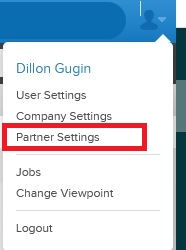
Click the top right and select Partner Settings:
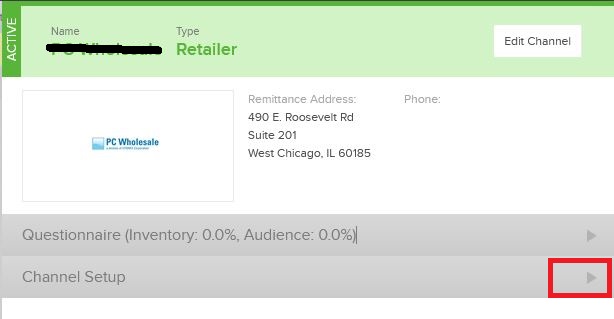
Select the channel you wish to apply the desired action, and open the drawer.
Select Channel Setup:
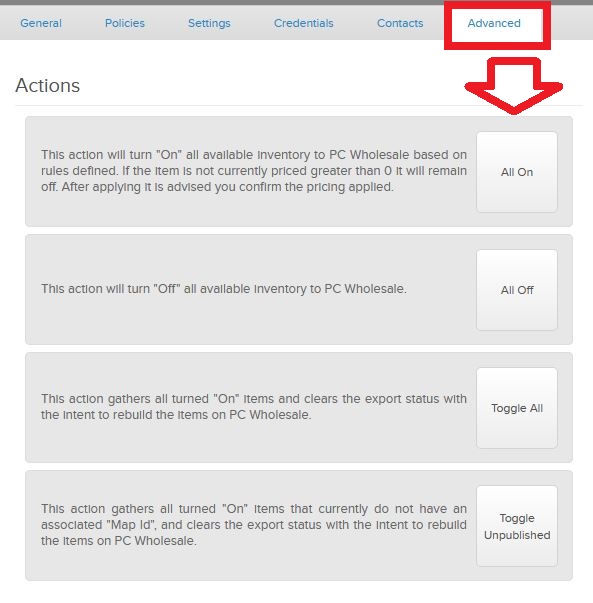
Select Advanced
Click the action you wish to apply to this partner.
All On:
This action will turn "On" all available inventory to the partner selected based on rules defined. If the item is not currently priced greater than 0 it will remain off. After applying it is advised you confirm the pricing applied.
You may see a checkbox:
This feature is very helpful if you do not have pricing in the feed yet. Checking this before clicking all on will pull the highest price from a neighboring feed that is "On" and enter that price for the desired/unpriced feed.
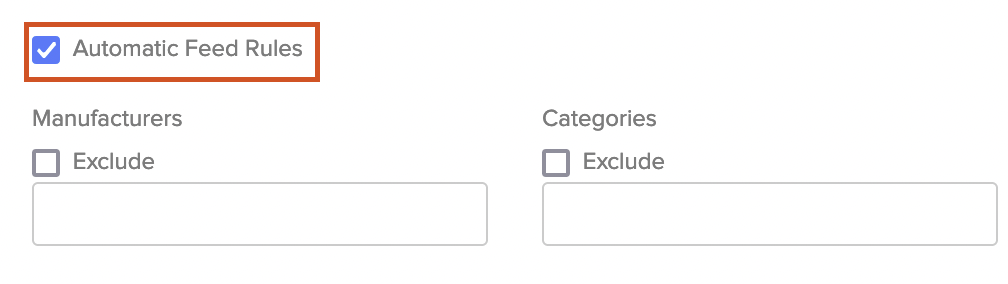
Important Note: Before doing an 'All On' make sure to confirm 'Automatic Feed Rules' is check-marked in the settings for the channel you're doing an 'All On' for. How to view and modify automatic feed rules for channels
If feeds are manually turned OFF at any time, that feed's auto-feed rules are disabled. That feed will need to be manually turned back ON for auto-feed rules to be re-enabled. Filter through Feeds to determine what remained off after an "All-On" action.
All Off:
This action will turn "Off" all available inventory to the partner selected.
Toggle All:
This action gathers all turned "On" items and clears the export status with the intent to rebuild the items on the partner selected.
Toggle Unpublished:
This action gathers all turned "On" items that currently do not have an associated "Map Id", and clears the export status with the intent to rebuild the items on the partner selected.
Comments
0 comments
Please sign in to leave a comment.