To make updates to an item’s SKU, you need to go into the inventory tab, search for the SKU of the item you are wanting to make changes to, and then click ‘Edit Product’, which can be found under the physical inventory tab.
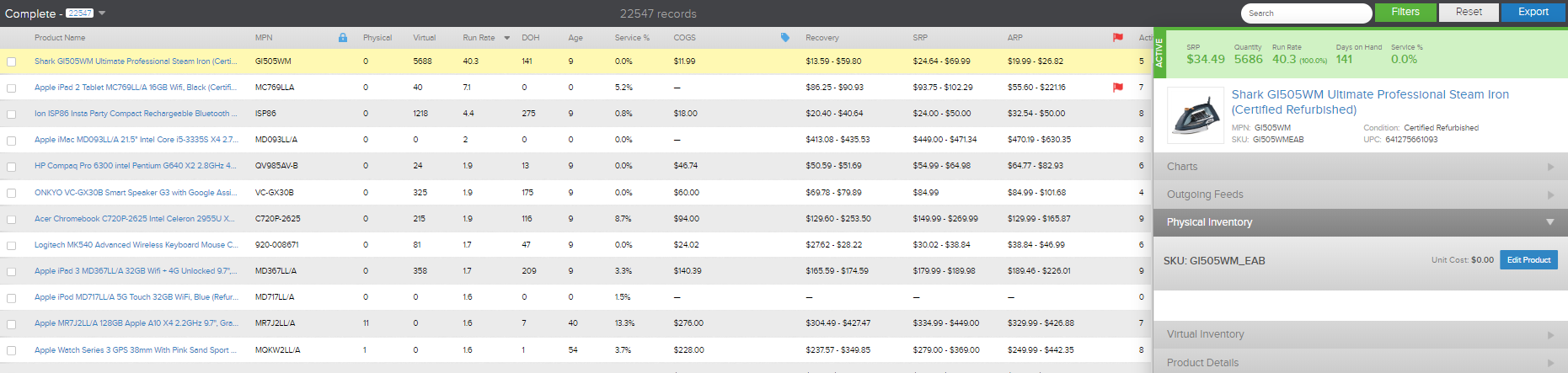
Once the edit screen is up, click ‘Edit Offer Details’. This screen allows you to edit the item SKU, MPN, warranty information, and condition, along with other things. To change the items’ SKU, simply clear out the current SKU and change it to the SKU you want it to have. Then click ‘Save Changes’. Continue to save until you get back to the screen that gives you the option either to ‘Create a New Inventory Item’ or ‘Back to Inventory List’ and then click back to inventory list to get back to the inventory page.
Comments
0 comments
Please sign in to leave a comment.