To get to the User Settings tab, you need to find the user icon in the upper right hand corner of the app, click the drop-down menu, and then select 'User Settings'.

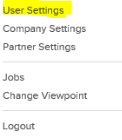
The User Settings tab contains information about your user profile specifically, as well as notification information, which you can customize to fit your preferences.
The notification screen will look similar to the below picture, where each user has the ability to customize the user's notification settings.
You have the ability to turn on/off email and in-app notifications, as well as customize the frequency at which you receive notifications.
There are notification settings for the following categories: Sales Orders, Purchase Orders, Inventory, Channel Initiated Requests, Vendor Processed Requests, Outsource, Reports, Feeds, and Miscellaneous.
Comments
0 comments
Please sign in to leave a comment.