Depending on the resolution type of the service request, processing the request will send a refund or create a replacement order for the customers return.
Navigate to your requests tab in Quipt.
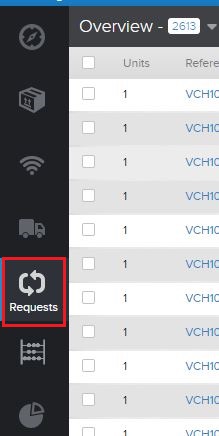
Locate the order using the search bar

You can use the order number, PO number, customer first and last name, or address to locate the service request.
If you cannot find the service request, you may need to create one to close. See Creating A Service Request.
Open the Service Request drawer
Select the process request option.
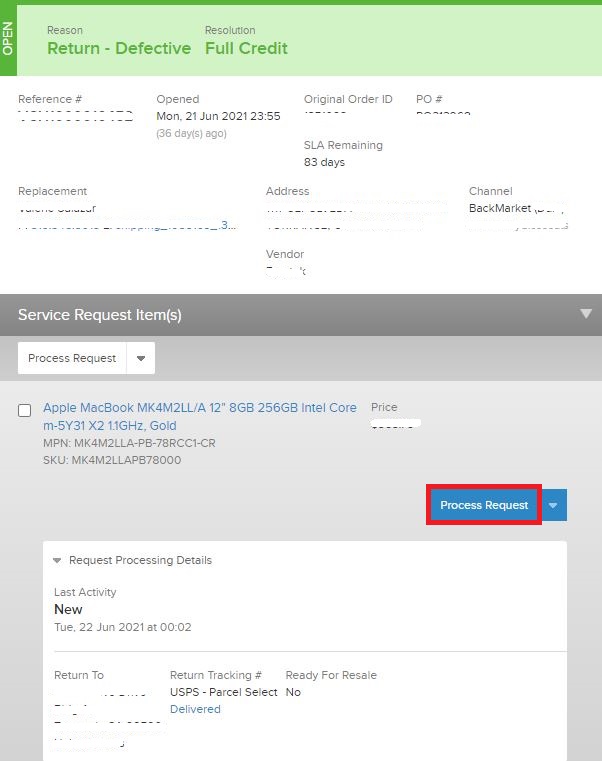
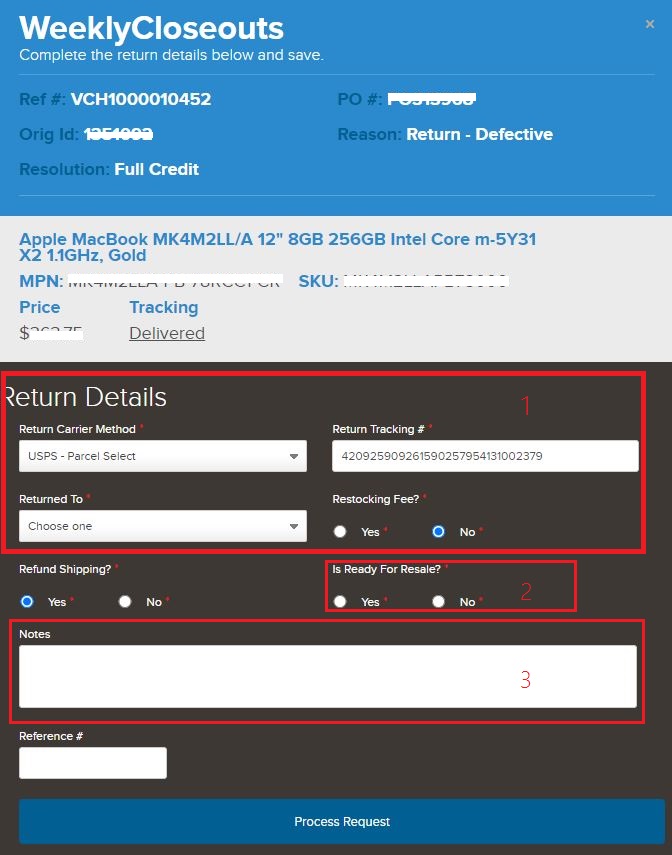
Confirm details
1. Confirm incoming tracking info: Carrier method, tracking number, and which warehouse location this return was received.
2. Confirm if you want this unit to re-enter your sellable inventory.
If item is defective, damaged, or untested, select no.
If the product is still sealed and untouched by the customer, select yes.
3. Enter any notes regarding the return.
4. Click 'Process Request'
SLA
Most channels require returns to be processed within 2 business days of the returns arrival. Use the date the tracking information is marked delivered for reference.
Action Required
After processing a service request, in certain cases the request can go into an action required state. Most likely the status will be "Message Waiting". See our KB article for Action Required Service Requests for information on how to correctly clear this status.
Comments
0 comments
Please sign in to leave a comment.