Service Requests that fall into a status which cannot be immediately created or processed based on certain policy settings or channel restrictions. These requests will always be highlighted in red so that they grab your attention.
These following status indicators tells the user what needs to be done to the request to accept/deny the request or to process/close the request.
Action Required Service Requests should be checked at least every 2 business days. The reason for checking AR is because refunds typically need to be processed within 2 business days of the returns delivery. If returns are processed in a timely manner and go into an AR status, they need to be cleared in a timely manner. This will help keep your eComm accounts healthy.
Request Status
- Approval Policy Failed
- The refund value $X,XXX.XX exceeds the current policy $X,XXX.XX. Manual approval required.
- Message Waiting
- Partner does not support refunds electronically. Use partner’s portal to provide a refund.
- Quipt is unable to post refunds for multi-units orders due to inability to confirm previous refunds. Use partner's portal to apply expected refund, $XXX.XX
- An attempt was made to apply a refund, but an error occurred. Use partner's portal to confirm refund applied.
- Return Policy Failed
- The following request was not approved for a prepaid label due to a policy exception.
- Warranty Failed
- Request entered is outside of return window of XX days. This request was received XX days since shipment. Accept or Cancel Line.
Resolving Action Required Requests
Approval Policy Failed
This service request is flagged because the value of the order exceeds the amount of auto-approved returns. The user need to manually approve or cancel the service request. User's can change the auto-approved amount. To do so:
- Head to partner settings
- Select the channel you wish to manipulate
- Select edit channel
- Edit policies
- Under requests, the different categories can be changed modularly. The text box you are looking to change is called "Restrictions:
Message Waiting
This service request has been processed and a refund has been sent to the channel. However, the channel either does not support automated refunds, the channel does not support refunds for multi-unit orders, or there was no confirmation from the channel that the refund was in fact processed. The user needs to check the refund manually in the channels portal then clear the message waiting status in Quipt. 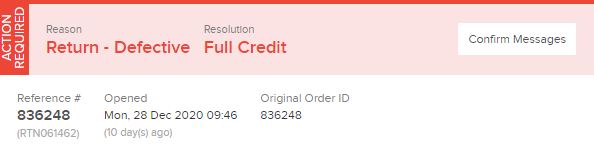
If the refund is not processed, refund the order in the portal then clear the message waiting status in Quipt. For multi-unit orders, the amount that is expected to be refunded will be visible in the "Confirm Messages" view. 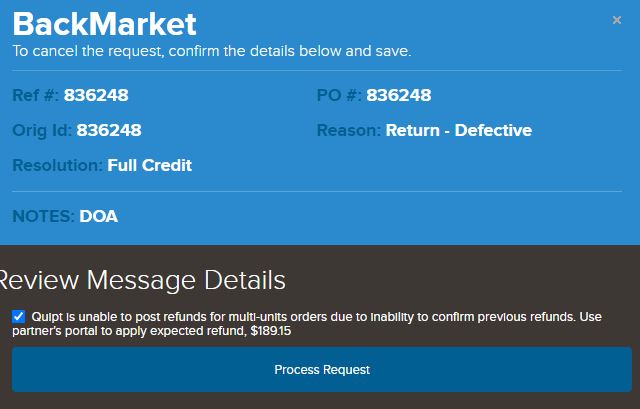
Return Policy Failed
This status tells the user that the service request was created to generate a shipping label but selected a reason that doesn't support automatic label creation. The user must verify whether a label is meant to be created or not. 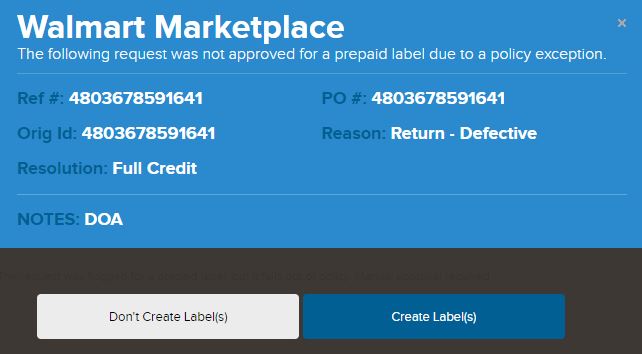
Warranty Failed
Warranty Failed status flags a service request when the order exceeds the days allowed for a return to be made. The user needs to manually accept or cancel the service request given the age of the order.
Comments
0 comments
Please sign in to leave a comment.