If you are seeing "Message to Retailer" Action Required orders, the SKU in Quipt may not match any entries in QuickBooks.
Possible Errors:
1. Duplicate SKU
2. SKU not in QuickBooks
Identification
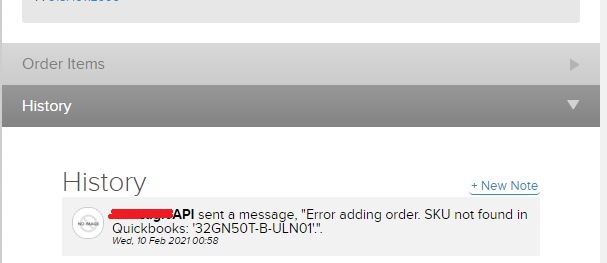
Open the order's "History". You should see an error message from your API or the retailers API. The message will look like the following visual:
Resolutions
Searching Quickbooks will confirm whether there is a duplicate entry or SKU is not in QuickBooks.
1. Duplicate SKU

- User will need to remove all of the duplicate entries in Quickbooks
- Confirm that one entry in QBX is listed for same the SKU in the Quipt order history message
- Quipt will re-sync with QuickBooks.
2. SKU not in Quickbooks
- User will need to add a QuickBooks entry using the same SKU that is in the Quipt order history message
- User will need to edit a pre-existing entry that is not matching to the exact SKU in Quipt
The entry in QuickBooks must match the exact SKU in Quipt for the order to process smoothly.
Comments
0 comments
Please sign in to leave a comment.