Purpose
This article demonstrates how to manually update the image on your Shopify site.
Process
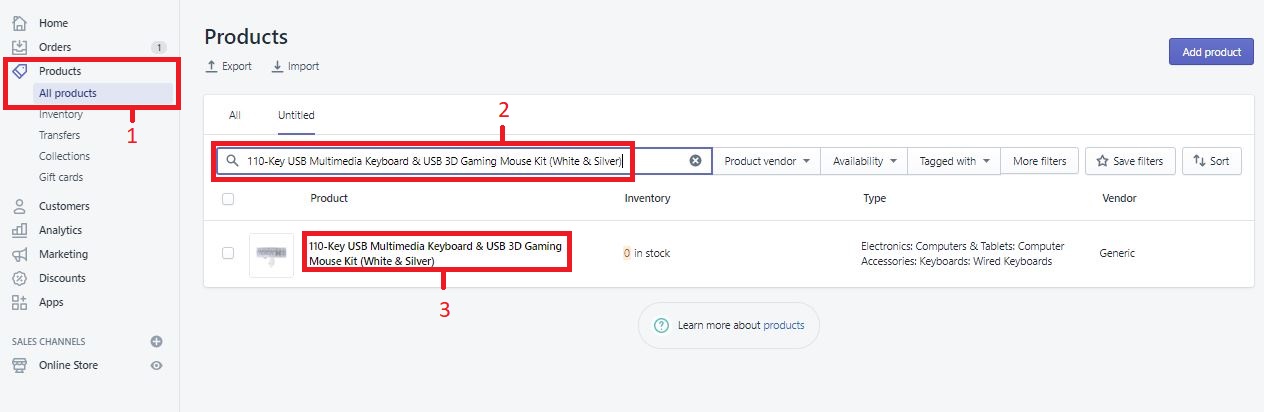
1. Login to your Shopify Admin Portal and go to: Products > All Products
2. Using the search, your product with the missing image. You can search the SKU or product title
3. Click the Product Title to open and edit the product
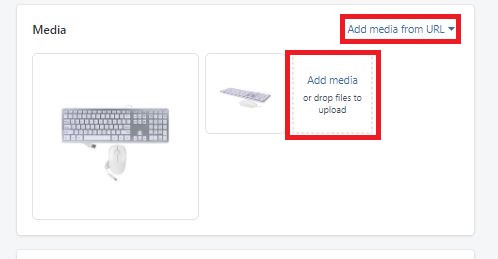
4. In the window that opens, scroll down till you reach a section labeled "Media"
5. Here you have 2 options. One is to Add Images by URL, and the second is to add via upload from your computer. Either can be used to upload new images to the listing. Once an image is uploaded, simply close the page as image changes are automatically saved
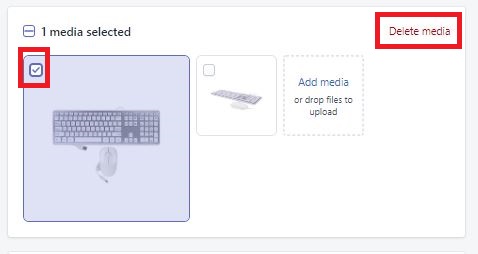
6. If you need to delete an existing image, simply hover over the image in question, click the check-mark box that pops up, and click the button for "Delete Media". Again, image changes are auto-saved, so you can simply simply close the window and your listing will be updated
Comments
0 comments
Please sign in to leave a comment.