Have you ever wondered how eCommerce channels create and manage an intuitive left side navigation that allow advanced filtration and search? The short answer; Lot's of work.
With Quipt's structured taxonomy, adding filtration to Shopify is simple and easy - And your customers will thank you for it!
Step 1. Access your apps from your Shopify Store
Step 2. Click "Product Filter & Search"
Step 3. Hover over "Filter" and select "Manage Filter Trees"
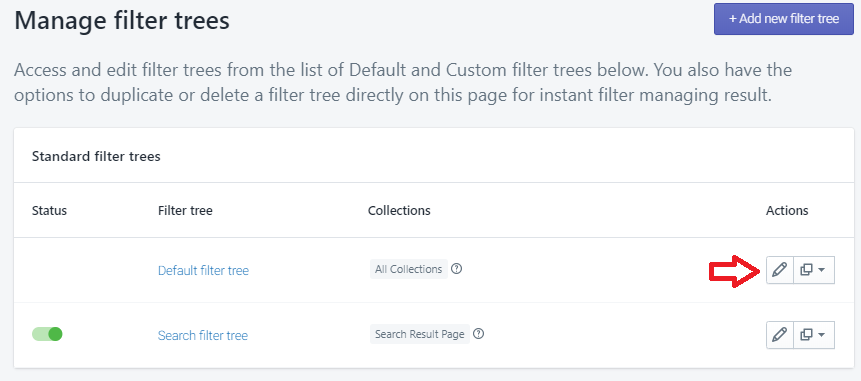
Step 4. Click the pencil icon next to the "Default Filter Tree"
Step 5. Select the option for "+ Add filter option"
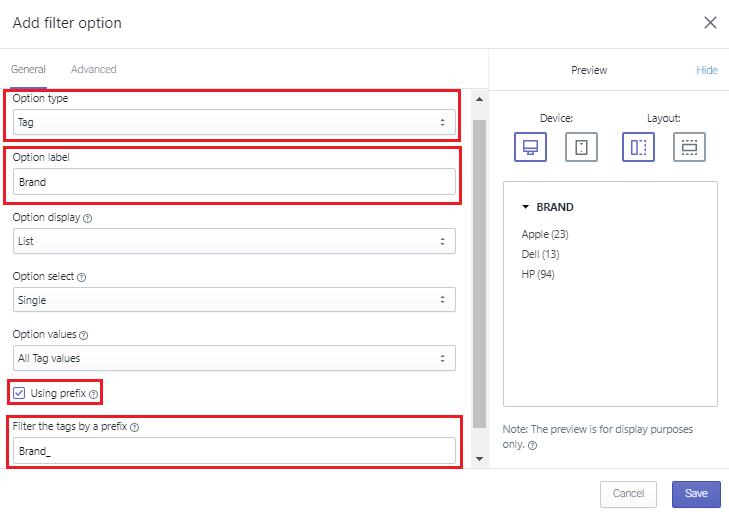
Step 6. For "Option Type", always default to "Tag"
Step 7. Name your filter using "Option label" - This is what customers will see
Step 8. Check the box for "Using prefix"
Step 9. Copy the corresponding Quipt attribute filter prefix into the bottom box
 Step 10. Save
Step 11. Rinse/Repeat
Step 12. Once you have added your last filter, save the app at the bottom of the page
Your customers now have the ability to filter products using category specific data provided by Quipt. All products published by Quipt will add these filters automatically, and only filters with matching products will be exposed. I.E. "Operating Sytem: Apple iOS" will be hidden if you only carry PC's.
Comments
0 comments
Please sign in to leave a comment.