To update or add inventory to an item, you need to go into the Inventory tab in Quipt, search for your item, and then click on the item. Once you have selected the correct item, you will go into the ‘Physical Inventory’ tab, locate the warehouse you want to add inventory to, and update the Quantity box to whatever inventory number you want the item to have. 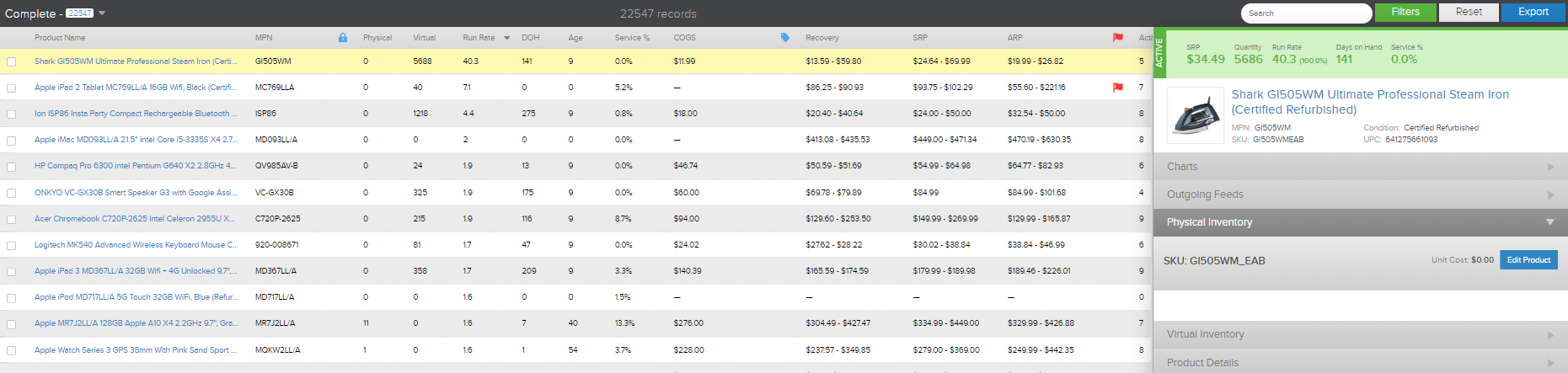
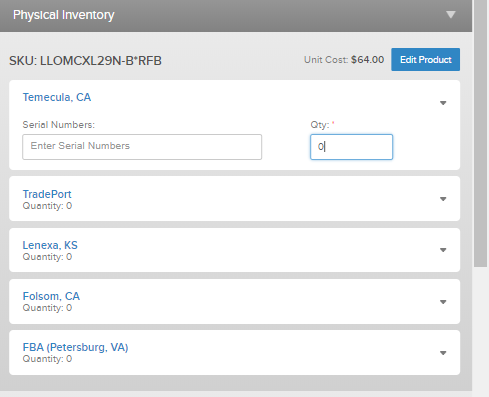
When an item is out of stock and you add inventory, for example, 10 units you just put 10 in the Quantity box. When the item already HAS inventory and you want to add to it, you will update the Quantity box to be the TOTAL number of units you want there to be on hand. So for example, there are 10 units on hand already, and you want to add 20 more units for a total of 30 units- you will update the Quantity box to be 30 units.
Comments
0 comments
Please sign in to leave a comment.